Troubleshoot
The troubleshoot methods are browser-console diagnostics for investigating why a Guides and Surveys content item does or does not appear on the current page. They're intended for developers and support engineers debugging targeting issues, not for use in application code. All methods are available on window.USETIFUL.troubleshoot.
The troubleshoot API is registered during full script initialization, so it becomes available once the usetiful:fullApiReady event has fired. Confirm it's ready before calling a method:
typeof window.USETIFUL?.troubleshoot?.checkTargeting === 'function'
For a non-developer walkthrough of the same tool—including a checklist of common reasons content doesn't appear—see Guides and Surveys: Troubleshooting in the Fullstory Help Center.
checkTargeting
Looks up a content item by type and ID, re-evaluates every targeting condition against the current page—without short-circuiting on the first failed condition—and prints a color-coded report to the console. Returns a structured result object containing the same information.
Parameters
- contentType string required
The content type to check:
tour,checklist,banner,survey, orsmartTips. - contentId number | string required
The content item's ID. You can find it as part of the URL when editing the item in the Guides and Surveys UI.
Finding the contentId
When editing content in the Guides and Surveys UI, the ID's position in the URL varies by content type. In each example below, the highlighted portion is the contentId:
| Content type | Example URL |
|---|---|
| Tour | .../product-tours/creator/1663 |
| Smart Tips | .../smart-tips-group/edit/6 |
| Checklist | .../checklist/edit/01KD2WRD7K0ZDGF6543HB3PJDJ |
| Banner | .../banner/edit/01KD2XRPBBDYHZCBYC83C3DX7W |
| Survey | .../survey/1f114180-5433-696e-9bae-c58dac5b4d69/edit |
Return value and console output
checkTargeting prints a color-coded report to the console and also returns the same information as a plain object, for use in your own debugging code.
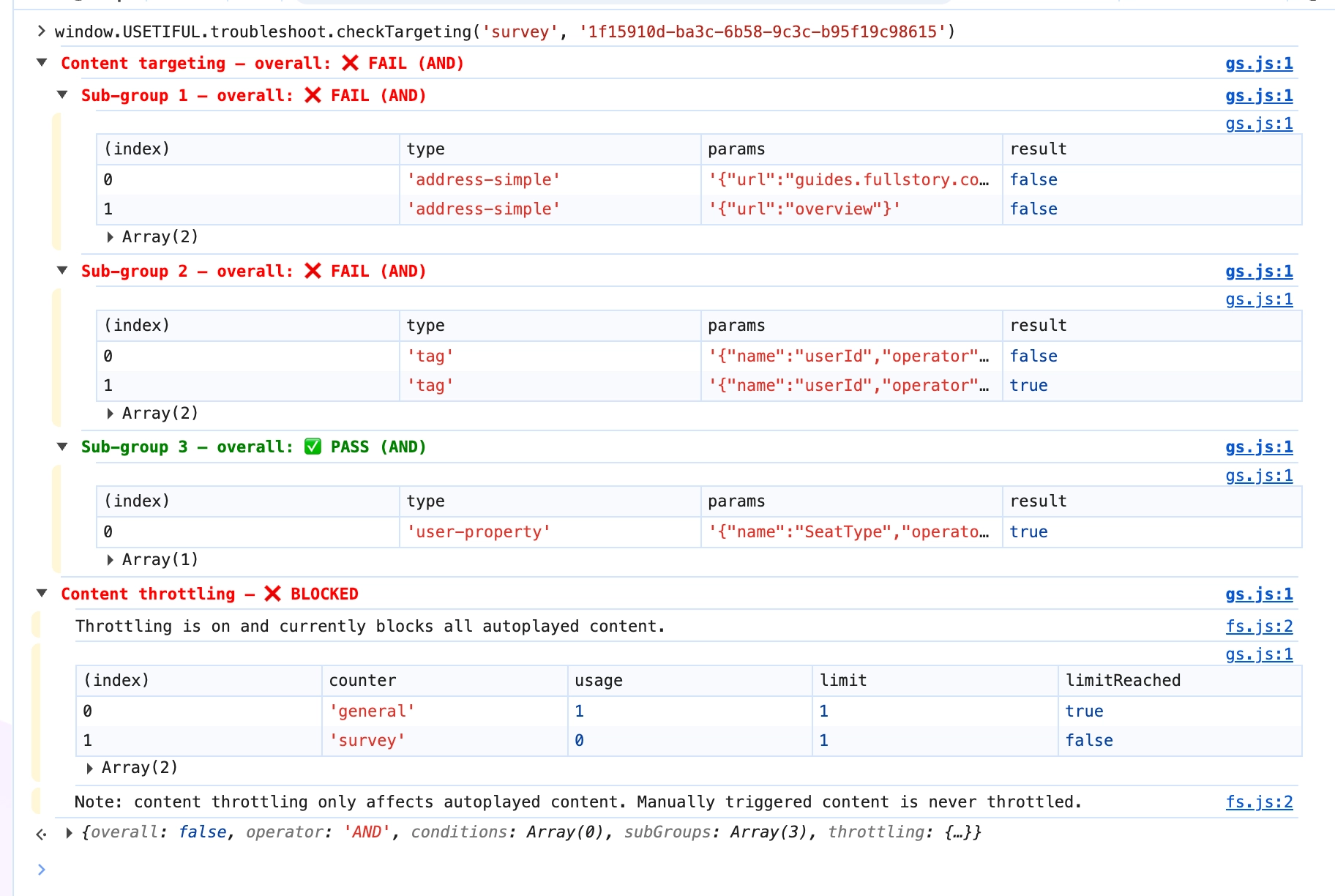
The returned object contains:
| Field | Description |
|---|---|
overall | Whether the content matches the current page. |
operator | How the top-level conditions combine: AND or OR. |
conditions | The result of each top-level targeting condition. |
subGroups | The result of each targeting sub-group, each with its own operator, conditions, and overall. |
throttling | Whether autoplayed content throttling is currently blocking this item. Only applies to tour and survey content—manually triggered content, and all other content types, are never throttled. |
throttling.state reports one of the following:
| State | Meaning |
|---|---|
not_applicable | Content type isn't subject to throttling. |
off | Throttling isn't enabled for the org. |
ignored | Survey has "ignore content throttling" set—always allowed. |
allowing_all | Throttling is on and currently allows this content. |
allowing_specific | Blocked by the survey-specific limit, but other content is still allowed. |
blocking_all | Blocked by the general limit—all autoplayed content is currently blocked. |
Error behavior
Returns null and logs console.error when:
- The content type is unknown.
- No currently loaded content item matches the provided ID or ULID.